

How B2B Founders Finally See Where Their Money Comes From
The Only Number That Actually Matters
What Your Performance Dashboard Should Show You First
Bounce rate on high-intent pages
From Click to Revenue with The Tracking Infrastructure
Layer 1: Campaign Attribution in GA4 with UTM Parameters
What GA4 shows you with proper UTM setup
Layer 2: Click Tracking Without Complexity with Trigger Links
Layer 3: Tracking Pixels for GA4, LinkedIn, and Multi-Channel Attribution
1. The Diagnostic Foundation with Google Analytics 4 (GA4)
2. The B2B Precision Standard with LinkedIn Insight Tag
3. The Retargeting & Optimization Layer with Meta Pixel
4. The Search Intent Layer with Google Ads Pixel
Is Your Tracking Actually Working?
The Only Number That Actually Matters
Every founder tracks something. Open rates, ad impressions, website visitors, social media reach. The pipeline fill up. The reports get longer. And yet, when someone asks"how much revenue did marketing generate this month?", the answer is usually silence, a guess, or a number nobody fully trusts.
There is one metric that cuts through all of it: Money-in.
How much revenue did the business collect. From which source. Through which channel. Attributed to which activity.
Everything else, every campaign metric, every click rate, every pipeline stage, is only valuable if it explains how it connects to that number. If a metric does not answer"what should I do next to make more money?" it is noise dressed up as data.
This article builds the tracking infrastructure from the ground up. We start with what the dashboard should show you, then go back to the measurement layer that makes it reliable.
What Your Performance Dashboard Should Show You First
Before we talk about tracking infrastructure, here is what a functioning B2B performance dashboard should display at a glance. Not 40 metrics. The ones that answer real questions: Where is the money?
The Money-in Layer
This is the top of the dashboard and the only number that cannot be manipulated. Revenue collected, divided among source and time period. Not leads, not pipeline estimates, not impressions, actual closed revenue attributed to the channel, campaign, or rep that generated it. Total revenue this month measured against a defined target. If there is no target, the number has no context and no direction.
Below that sits the source breakdown, owner-led deals, outbound email and calls, organic search, paid ads, referrals, events, direct enquiries, etc. This tells you which channels are actually closing, not just generating activity. Alongside it, the split between new clients and returning clients reveals whether the system is acquiring new revenue or living off existing relationships. And average deal value tracked over time tells you whether targeting is improving, a declining average signals drift toward smaller or lower-quality opportunities, a rising average signals the opposite. These four data points together give you a complete picture of where revenue is coming from and whether the engine is healthy or quietly deteriorating.
The Pipeline Layer
Below Money-in sits the pipeline, the leading indicator of next month's revenue. If Money-in tells you what happened, pipeline tells you what is coming. It is not as definitive as closed revenue, but without it you are running sales on instinct rather than data and recorded processes.
Active opportunities by stage
How many deals exist, where they sit, and what the historical close probability is at each stage. For a full breakdown of how pipeline stages can be structured, read our article on building a B2B sales system.
Pipeline velocity
How fast opportunity profiles are moving through stages. Slowing velocity is an early warning signal, it appears in pipeline data weeks before it shows up in revenue.
Stuck deals
Active opportunities with no logged activity in the last 7 days and no justified waiting status. These are the deals most likely to go cold without intervention.
Conversion rate by stage
Where deals drop off most frequently. A low conversion from proposal to close is a pricing or fit problem. A low conversion from first contact to qualified conversation is a targeting or messaging problem.
The Channel Activity Layer
Below pipeline sits channel performance, the activity that feeds the pipeline. The objective is to build enough data to know your customer acquisition cost (CAC) and lifetime value (LTV). These two numbers are the foundation of data-driven decision making. How did your last campaign affect CAC and LTV? What is the month-over-month condition of your revenue engine? Did a campaign reveal a weak spot, and did you establish a baseline through A/B testing? These are the directional values that help you scale what is working and cut what is not.
As a founder you may choose one or multiple acquisition channels simultaneously. It can be anything from email outreach, paid ads, SEO, events, cold calling, newsletter, trade shows, etc. The channel mix does not matter as much as having a consistent way to measure each one against the same north star: how much revenue did this channel contribute.
Most founders measure cashflow, leads generated, cost per click, website visits, events attended. But does it bring you closer to the growth? Without source attribution it is wasted valuable data. What the system needs to answer is which channel generated a conversation, which conversation became a deal, and which deal produced revenue. All traced back to the original source so you can see clearly what brings in clients and what does not.
That said, not every activity is designed to generate revenue directly. Some channels build brand awareness. Others increase trust over time. A blog article that never generates a direct enquiry may still be the reason a prospect recognized your name when a cold email arrived three weeks later. A good tracking system accounts for both, direct attribution where it is measurable, and indirect influence where it is challenging.
Here is how each channel maps to a measurable output:
Email outreach
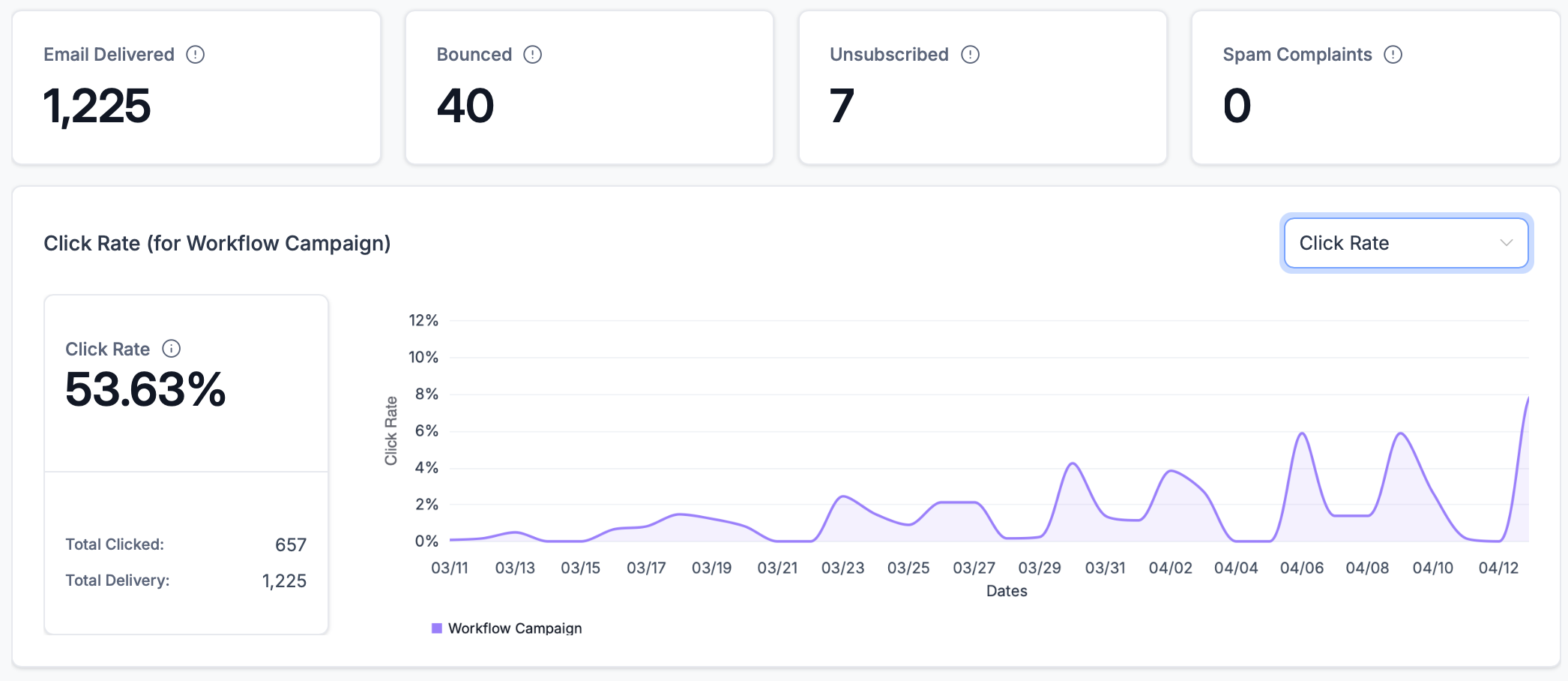
Measured by sends, open rate, click rate, reply rate, and pipeline conversions. Open rate tells you whether your subject line works. Click rate tells you whether your content is relevant. Reply rate tells you whether your targeting and message land. And pipeline conversions tell you whether any of it is generating revenue. For the full breakdown of how the email system works, read our article on building an email lead generation system for SMBs.
Paid advertising
Measured by spend, clicks, conversion, and cost per conversation. The number that matters is how much it costs to generate income. A campaign with fewer clicks but a lower cost per qualified enquiry is always the better investment. A strategically smart extension of paid ads is retargeting. This can be activated when a prospect visits your website, the pixel captures that visit and shows them a targeted ad on LinkedIn or Meta featuring exactly what they viewed. This runs on an autopilot on website and can turn every visit into a following touchpoint without any manual follow-up required. This will be described more in details in our upcoming article about paid advertising.
SEO and organic search
Measured by organic sessions to high-intent pages, not total traffic. A thousand visits from irrelevant keywords contributes nothing to pipeline. What matters is whether the right people are finding your services, pricing, and booking pages through search.
Newsletter
Measured by click-through rate on tracked links, form submissions attributed to email source, and revenue per campaign. For businesses selling products or services online, the most important metric is campaign conversion rate and its effect on customer lifetime value. In other words, how much total revenue one subscriber generates over time.
Cold calling
Measured by conversations started, meetings booked, and pipeline entries created. The ratio between call volume and booking/pipeline entries tell you whether your targeting list and opening approach are working.
Events and trade shows
Measured by contacts collected, website visits initiated, follow-up sequences started, meetings booked, and purchases made. An event is only as valuable as the system behind it. Without a structured follow-up sequence, QR scans and a business card exchange your yield from the event can make you unsatisfied. Every qualified lead should get a follow-up and tracked conversation.
Social media
Measured by profile visits, link clicks via tracked trigger links, direct message conversations started, and leads attributed to social source in the CRM. Reach and follower count are vanity metrics. What matters is how many people moved from a post to your website, from your website to a conversation, and from a conversation to a pipeline entry. Organic social builds trust over time. Paid social generates measurable traffic. Both need tracked links to connect content activity to revenue.
Web conversion
If you don’t run e-com model then this channel is measured by form submissions, booking calendar completions, and direct enquiries attributed to the source or page they came from. This is where all other channels eventually land. Every prospect, regardless of how they first found you, will visit your website before deciding to reach out.
Chat apps
Measured by conversation starts across channels, primarily WhatsApp for industrial B2B. A message sent directly to your business is the highest intent signal a prospect can give outside of a booking. With active ad campaign WhatsApp becomes your lobby, where potential clients come to say „Hi“. Track volume by channel, response time, and how many conversations convert to a pipeline entry.
The challenge is not knowing what to measure. The challenge is building the tracking layer that makes every one of these numbers reliable and connected to the same revenue outcome.
The Web Metrics Layer
Your website is the conversion engine. It can be trust builder or channel. A prospect who sees your LinkedIn post, opens your cold email, or clicks your ad, they all eventually land on your website before deciding whether to perform any of designed option likes contact you, purchase, or download.
The metrics that matter here are not vanity numbers:
Submissions and conversions
In case you don’t run e-com model, the form completions, booking calendar entries, and direct enquiries are the main actions that signal buying intent and feed the sales pipeline. Every other web metric is a supporting indicator.
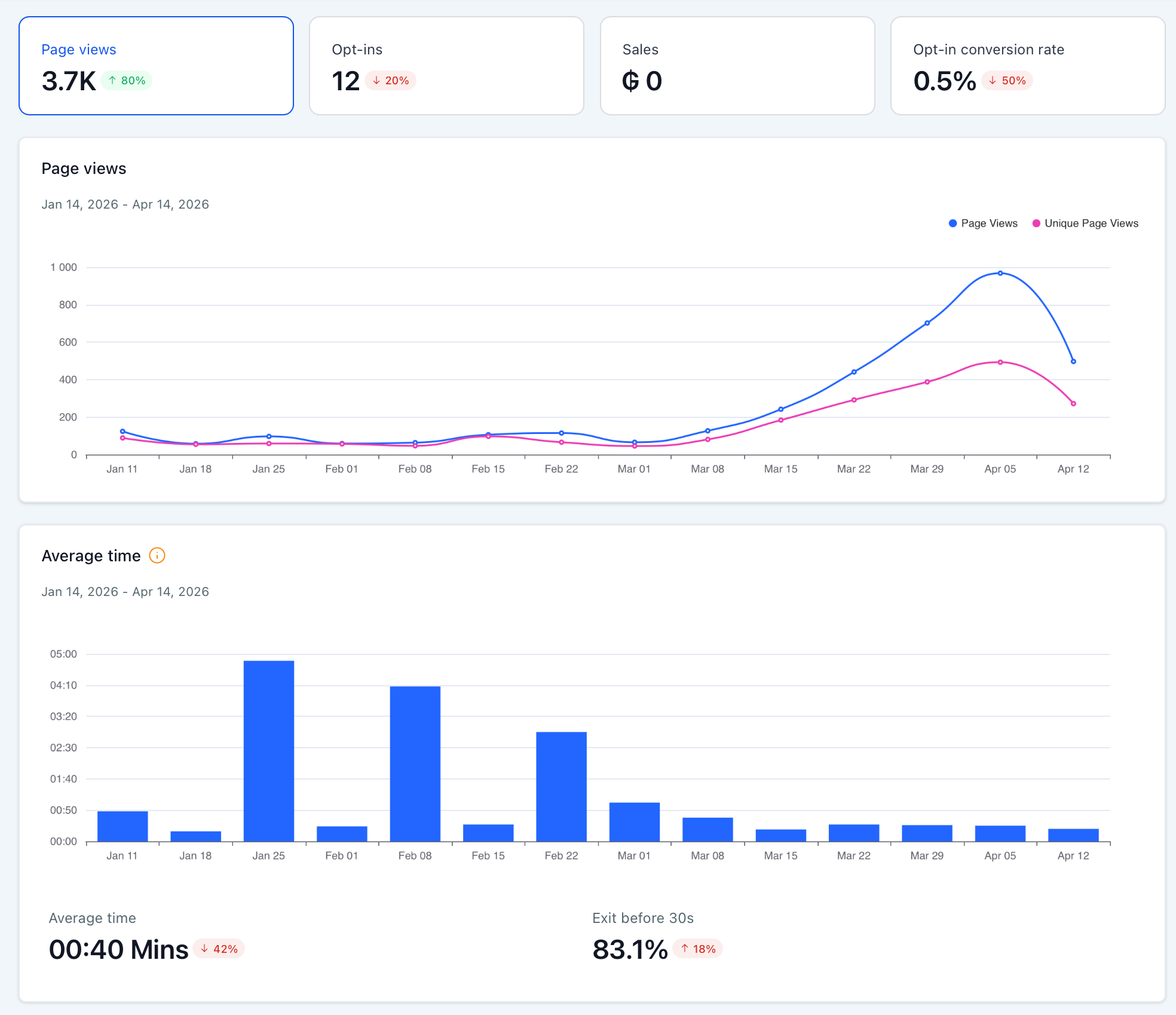
High-intent page views
Visits to your pricing, services, products, booking, and contact pages. These are the pages prospects visit when they are evaluating whether to reach out. Rising high-intent page views with flat form submissions signals a conversion problem on the page itself, not a traffic quality.
Bounce rate on high-intent pages
If prospects land on your services page and immediately leave, look for the problem on the page. A high bounce rate on a high-intent page means the message, the layout, or the load speed is breaking the conversion before it happens.
Unique visitors
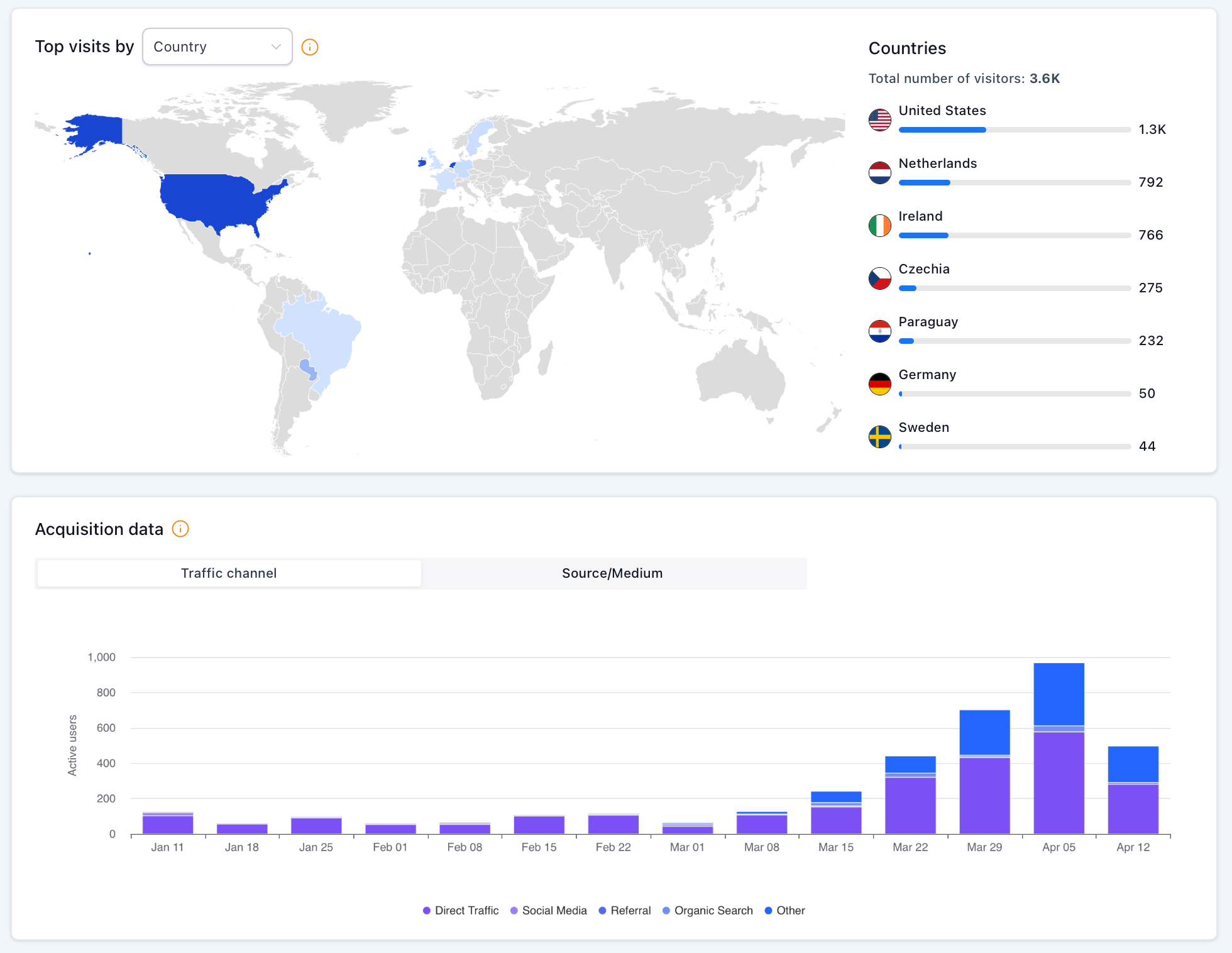
Measured by total and by source. This is your digital reach map, how many people found you, and through which channel. Organic, paid, direct, referral, and social broken down separately so you know which channels are actually delivering traffic worth having. An industry standard is Google Analytics 4 (GA4) that provides a granular layer for campaigns data. I personally use more our native analytics in software we use for every our client, which works just fine until you start analyzing UTM parameters.
From Click to Revenue with The Tracking Infrastructure
This is the layer most B2B founders skip. They run campaigns, look at results, but the data is fragmented, and therefore undigestible. Email KPIs live in one place, ads in another, web traffic in a third, and nothing connects back to the CRM and sales pipeline where the actual contact and deal is tracked. A functioning tracking infrastructure has three layers, built in.
Layer 1: Campaign Attribution in GA4 with UTM Parameters
UTM parameters are five small tags you append to any URL to tell your analytics platform exactly where traffic came from and which campaign generated it.
UTM parameters are five small tags you append to any URL. Together they tell your analytics platform exactly where traffic came from, through which channel, and which specific campaign or creative generated it. utm_source identifies the platform like facebook, linkedin, newsletter, google. utm_medium identifies the channel type like cpc, email, social, organic. utm_campaign names the specific campaign like 2026launch, cold-outreach-march, trade-show-prague. utm_content differentiates creative variants within the same campaign like button-cta, text-link, image-ad. And utm_term captures the keyword for campaigns.
This is how the links can look https://agencydiamondhands.com/post/s1e1-email-lead-generation-system-smb?utm_source=SMM&utm_medium=fb&utm_campaign=ad1&utm_content=id1
I know, it’s very ugly and lowers trust. That’s why you learn more about link shortening in next part of this article.
When a prospect clicks a UTM-tagged link and lands on your website, GA4 captures all UTM parameters and attributes the visitor’s session, and any subsequent conversion, to the correct source. Without UTMs, traffic from email campaigns frequently appears as „Direct" in GA4, which means the channel that generated it gets zero credit.
Important to keep in mind, the UTM values are case-sensitive in GA4. Facebook and facebook appear as two separate sources. Establish a naming standards like lowercase only and hyphens between words, and document it. Inconsistent naming creates fragmented data that cannot be reconciled after that.
What GA4 shows you with proper UTM setup
How „campaign performance“ trends over time, week by week, month by month
Which source and medium combination produces the highest-value traffic
Which sessions converted to form submissions or booking completions
Which campaigns drove the most sessions
UTM parameters pass into our platform automatically when a prospect submits a form, meaning you can see, inside the CRM contact record, exactly which campaign source generated that lead. This connects the click to the pipeline entry to the deal to the revenue.
Layer 2: Click Tracking Without Complexity with Trigger Links
Trigger links are tracked short URLs hosted on a subdomain. In our case, I host the trigger link app on links.agencydiamondhands.com. That record every click against a specific link ID, with a timestamp and source context.
For example this is my trigger link that leads to the article you are currently reading https://links.agencydiamondhands.com/l/c9lYSmRQW. No UTMs visible at all, only legit subdomain link with short code behind the .com/.
This is the simplest and most underused tracking tool available to B2B founders. Here is what trigger links solve:
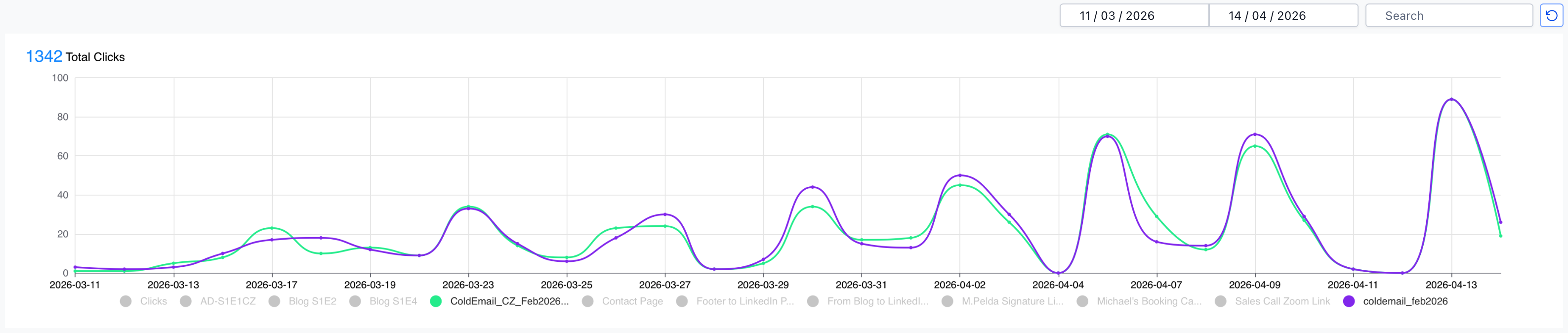
You send the same link in an email campaign, a LinkedIn post, and a newsletter. Which channel drove the most clicks? Without trigger links, you cannot know. They all look the same in your analytics. With separate trigger links per channel, each click is logged individually and you visualize it in time and amount.
You want to know which sales rep's emails generate the most engagement. Each rep uses their own trigger link variants. The dashboard shows you click volume by rep over time.
You want to track which piece of content drives the most traffic back to your booking calendar. Each content piece uses a unique trigger link. You see exactly which article, which post, and which email drives bookings.
Trigger links also keep URLs short. Instead of a long URL with UTM parameters appended, which looks messy and dangerous in email and on socials, the trigger link is a clean short code that you can trust because of short domain that looks like if pointing on normal website. But behind it, the full tracking data is captured automatically.
Layer 3: Tracking Pixels for GA4, LinkedIn, and Multi-Channel Attribution
A tracking pixel is a snippet of code that captures intent on your website. It logs page views, form submissions, and events like download, upload, purchase, cancelation etc.. That data goes back into your revenue engine to map the buyer’s journey and for creating audiences for retargeting with campaigns.
For B2B founders in the industrial and mechanical sectors, data is only an asset if it identifies high-value intent. To build a predictable scaling, your infrastructure should prioritize these tracking layers:
1. The Diagnostic Foundation with Google Analytics 4 (GA4)
GA4 is your primary dashboard. It tracks the lifecycle of every session, records UTM attribution, and measures conversion events. For engineering firms, this means tracking not just "visits," but specific intent signals like technical spec downloads or Request for Quote submissions.
2. The B2B Precision Standard with LinkedIn Insight Tag
In the mechanical engineering SME sector, the LinkedIn Insight Tag is a non-negotiable asset. Unlike consumer pixels, it provides professional data. It allows you to see the job titles, industries, and company sizes of your website visitors. This allows you to verify if your traffic consists of Lead Engineers and Procurement Managers or irrelevant clicks, enabling surgical retargeting.
3. The Retargeting & Optimization Layer with Meta Pixel
If you utilize Meta (Facebook/Instagram) for brand awareness, talent acquisition or hiring, this pixel is essential. It fires conversion events, specifically form submissions and booking completions, back to the ad platform. This allows the algorithm to optimize ad delivery toward profiles similar to your existing leads and keeps your brand top-of-mind for prospects who have already visited your site.
4. The Search Intent Layer with Google Ads Pixel
If you run or plan to run Google Search campaigns, the Google Ads conversion tag must be installed separately from GA4. It tracks which search queries led to a conversion, a form submission, a booking, a phone call, and feeds that signal back into Google Ads to optimize bidding toward searches that actually produce qualified enquiries. Without it, Google Ads optimizes for clicks. With it, it optimizes for revenue-relevant actions. For industrial B2B companies where buyers search with high-specificity queries like "CNC machining supplier Central Europe" or "automation integrator quote“, this distinction directly affects the quality and cost of every lead the campaign generates. This will be described more in details in our upcoming article about paid advertising.
Pixel Installation Sequence
To ensure data integrity and cross-system validation, follow this deployment order:
Deploy GA4 – install the global site tag across all pages and configure conversion events for high-intent actions: form submissions, booking completions, and contact page enquiries.
Install the LinkedIn Insight Tag – start building professional audience segments immediately based on specific page visits, so retargeting campaigns have data to work with from day one.
Install the Meta Pixel – map the same conversion events as GA4 to ensure consistent reporting across both platforms and building audience for Meta as well. Install it months before running any Meta ads, not before the first campaign.
Standardize UTM parameters – implement consistent UTM tagging across all outbound assets like email campaigns, LinkedIn posts, newsletter links, and any content shared externally that you want to measure.
Activate trigger links – use tracked short links together with UTM parameters for all shared content so every click is logged against the correct contact, channel, and campaign in the CRM.
This sequence ensures every visitor session is captured by at least two independent systems. Cross-validation between GA4, your ad platforms, and LeadConnector is what separates reliable data from numbers you have to second-guess. And thanks to pixel you can also start building audience for retargeting your web visitors with ads. This will be described more in details in our upcoming article about paid advertising.
The tracking infrastructure described in this article is a solid foundation for almost every business. This is not complex to build. It requires one day of setup, pixel installation, UTM naming convention, trigger link configuration, and then it runs automatically, feeding your dashboard with reliable data every day.
Is Your Tracking Actually Working?
Easy Self-Assessment
Answer honestly. These five questions reveal whether you have a measurement system or a collection of disconnected numbers.
Do you know, right now, which channel generated the most revenue last month?
Are your email campaigns tracked with UTM parameters so GA4 attributes them correctly, or do they appear as "Direct" traffic?
Is your pixels installed and firing conversion events before you spend on ads?
Do you use separate tracked links for different channels so you can compare click performance across reps, email campaigns, socials, and content plans?
Can you see, inside your CRM contact record, which campaign source generated each lead?
If you answered NO to two or more, you are making marketing and sales decisions based on incomplete data. Every budget decision, every channel prioritization, every campaign continuation is a guess until the tracking layer is built correctly.
Ready to improve?
Free 20-minute conversation with Diamond Hands founder Ing. Michal Pelda.
No pitch, no generic deck, a real check of your specific setup and you leave with a clear picture of what your system could be doing.


